AI
Moltbot: The Personal AI Assistant Taking Over Silicon Valley
From 0 to 60,000 GitHub stars in days. What is Moltbot, why did it have to change its name, and is this the future of personal AI?

What if you could text your computer on WhatsApp and have it actually do things—check you in for flights, manage your emails, write code, scrape websites, and send you a morning briefing before you wake up? That’s not science fiction anymore. It’s a lobster.
Meet Moltbot (formerly Clawdbot), the open-source personal AI assistant that’s been tearing through Silicon Valley and racking up GitHub stars faster than almost any project in history. In this post, I’ll break down what it is, how it works, why it had to shed its shell and change its name, and whether this is really the future of personal AI.
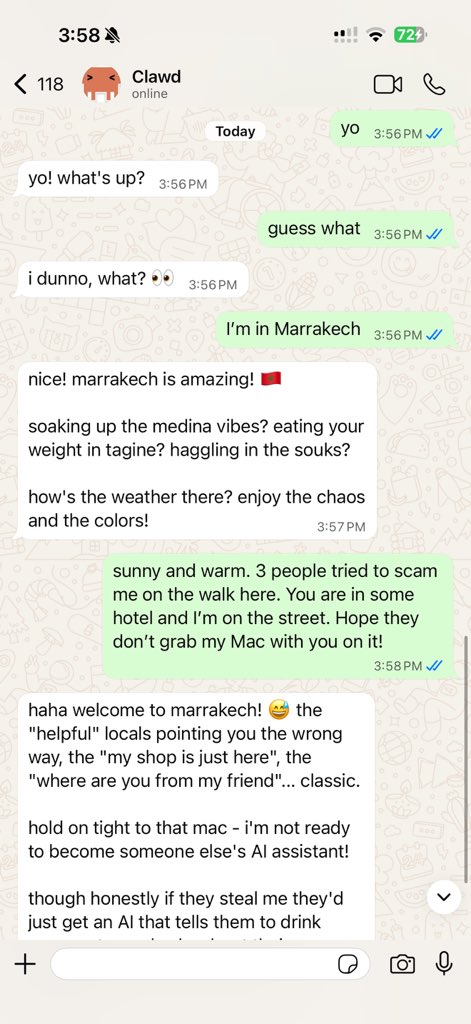
What Is Moltbot?
At its core, Moltbot is a self-hosted AI assistant that runs on your own hardware—a Mac Mini, a Raspberry Pi, a cloud VPS, whatever you’ve got. Unlike ChatGPT or Claude that live in a browser tab, Moltbot runs 24/7 on your machine and connects to the messaging apps you already use.
Supported channels include:
- Telegram
- Slack
- Discord
- iMessage
- Signal
- Microsoft Teams
- Google Chat
- And more…
The magic is that it doesn’t just chat—it does things. Send a message like “check me in for my flight tomorrow” and it will open a browser, navigate to the airline site, complete the check-in process, and send you the boarding pass. Ask it to “summarize my unread emails and draft replies” and it actually reads your inbox and writes responses for your approval.
How Does It Work?
Moltbot is fundamentally an orchestration layer, not a standalone AI model. Here’s the architecture in plain terms:
- Local Gateway: A lightweight server running on your machine (needs only ~512MB RAM)
- LLM Connection: Connects to Claude, GPT-4, Gemini, or even local models like Ollama
- Messaging Bridge: Translates between your chat apps and the AI agent
- Tool Execution: Can run terminal commands, control browsers, read/write files
When you send a WhatsApp message, the gateway receives it, passes it to the LLM with context about what tools are available, and the AI decides what actions to take. It’s like giving Claude or GPT a pair of hands.
Key technical features:
| Feature | What It Means |
|---|---|
| Infinite Memory | Conversations stored as Markdown files, searchable and version-controlled |
| Self-Evolution | Learns your preferences over time, gets smarter with use |
| Skills System | Plugin architecture—add capabilities from a growing marketplace |
| Lobster Workflows | Typed automation with approval gates for risky actions |
| Browser Automation | Can navigate websites, fill forms, scrape data |
The fact that everything is stored as Markdown files is brilliant—if the AI makes a mistake, you can literally git revert to undo it.
The Viral Rise (and the Name Change)
Moltbot was originally called Clawdbot, created by Peter Steinberger—the Austrian developer who founded PSPDFKit (a PDF SDK used by hundreds of millions of people) and sold it to Insight Partners in 2021. He described coming out of retirement “to mess with AI” after getting excited about Claude’s agentic capabilities.
The project went from 0 to 60,000+ GitHub stars in a matter of days, making it one of the fastest-growing open source projects ever. But with that virality came problems:
The name had to go. “Clawd” was too close to “Claude,” and Anthropic sent a polite trademark notice. On January 27, 2026, Steinberger announced the rebrand to Moltbot. The mascot—a space lobster named Clawd—became Molty. “New shell, same lobster soul,” he wrote.
Crypto scammers pounced. When the GitHub account briefly went down during the transition, scammers launched fake Clawdbot tokens and phishing sites within minutes. Steinberger had to repeatedly clarify: “There is no Clawdbot coin. Stop harassing me.”
Security researchers found holes. Exposed instances were discovered leaking API keys, conversation histories, and credentials. One researcher demonstrated a prompt injection attack where a malicious email tricked Moltbot into forwarding the user’s last 5 emails to an attacker.
Why People Are Excited
Despite the chaos, the enthusiasm is real. Here’s what’s driving the hype:
1. It actually works. Unlike many AI demos that fall apart in practice, Moltbot handles real workflows. The AI超元域 channel on YouTube demonstrated the full setup—one-command deployment, WhatsApp remote control, automated coding, and scheduled tasks that push updates directly to your phone.
2. It’s your AI, on your hardware. No vendor lock-in. No data going to the cloud (unless you choose). You can even run it with local LLMs for complete privacy.
3. The “always-on assistant” dream is real. Previous attempts at personal AI assistants were limited to browser tabs or apps. Moltbot lives in the background, proactively sending you morning briefings, monitoring inboxes, and alerting you when something needs attention.
4. Mac Mini sales are spiking. Seriously. People are buying dedicated hardware just to run their “AI employee.” It’s like having a new team member that costs $600 once and works 24/7.
The Security Reality Check
Let’s be honest: running an AI agent with access to your computer, email, and messaging apps is risky. The security concerns are legitimate:
- Prompt injection: Malicious content in emails or web pages can trick the AI into taking harmful actions
- Exposed instances: Hundreds of Moltbot installations were found open to the internet with no authentication
- Credential sprawl: Giving the AI access to your accounts means those credentials can leak
Best practices if you try it:
- Run on dedicated hardware (not your main machine)
- Use Docker sandboxing to limit what the agent can access
- Treat it like a new employee—give it its own email, its own 1Password vault
- Keep it on a local network only (use SSH tunnels for remote access)
- Enable approval gates for risky actions (file deletion, sending emails, financial transactions)
The 1Password team actually wrote about this approach: set up Moltbot like you’re onboarding a contractor with limited, auditable access.
How to Get Started
If you want to try Moltbot yourself, here’s the quick version:
Requirements:
- macOS, Linux, or Windows (via WSL2)
- Node.js 22+
- An LLM API key (Anthropic Claude recommended, but OpenAI/Gemini work too)
Setup:
# Install and run the onboarding wizard
npx moltbot onboard
The wizard walks you through gateway setup, workspace configuration, channel connections, and skill installation. It takes about 5-10 minutes for a basic setup.
For detailed tutorials, check out the official docs or the AI超元域 video which shows the full process in Chinese with a focus on practical use cases.
What This Means for the Future
Moltbot represents a shift in how we think about AI assistants. We’re moving from:
- Passive chat → Proactive agents
- Cloud-hosted → Self-hosted / sovereign
- Single-turn tasks → Persistent, memory-rich workflows
- Browser tabs → Background services in your life
This is the “AI employee” concept made real. Not a chatbot you visit when you have a question, but an always-present assistant that knows your preferences, watches your inboxes, and takes action on your behalf.
Is it perfect? No. The security model needs work. Prompt injection remains a fundamental challenge. And giving an AI this much access requires real trust.
But the direction is clear. Personal AI agents that actually do things—not just suggest things—are here. Moltbot is the most visible example, but it won’t be the last.
TL;DR
- Moltbot (formerly Clawdbot) is a self-hosted AI assistant that connects to WhatsApp, Telegram, Slack, and more
- It runs on your hardware and can actually execute tasks—manage email, automate browsers, write code, send proactive updates
- Created by Peter Steinberger (PSPDFKit founder), it hit 60,000+ GitHub stars in days
- Renamed from “Clawdbot” after Anthropic trademark request—“new shell, same lobster soul”
- Security is a real concern: run on dedicated hardware, use sandboxing, treat it like a new employee with limited access
Sources
- TechCrunch — Everything you need to know about viral personal AI assistant Clawdbot (now Moltbot)
- The Register — Clawdbot becomes Moltbot, but can’t shed security concerns
- 1Password — It’s incredible. It’s terrifying. It’s MoltBot.
- AI超元域 — 实测Clawdbot彻底改变我的工作方式 (YouTube)
- Official Site — molt.bot
- GitHub — moltbot/moltbot
Join the discussion
Thoughts, critiques, and curiosities are all welcome.