AI
GStack: Why the YC CEO's Claude Code Setup Broke Twitter
Garry Tan open-sourced his AI coding workflow and the internet lost its mind. Here's what GStack actually is, how it works, and the philosophy behind treating AI like a software team.
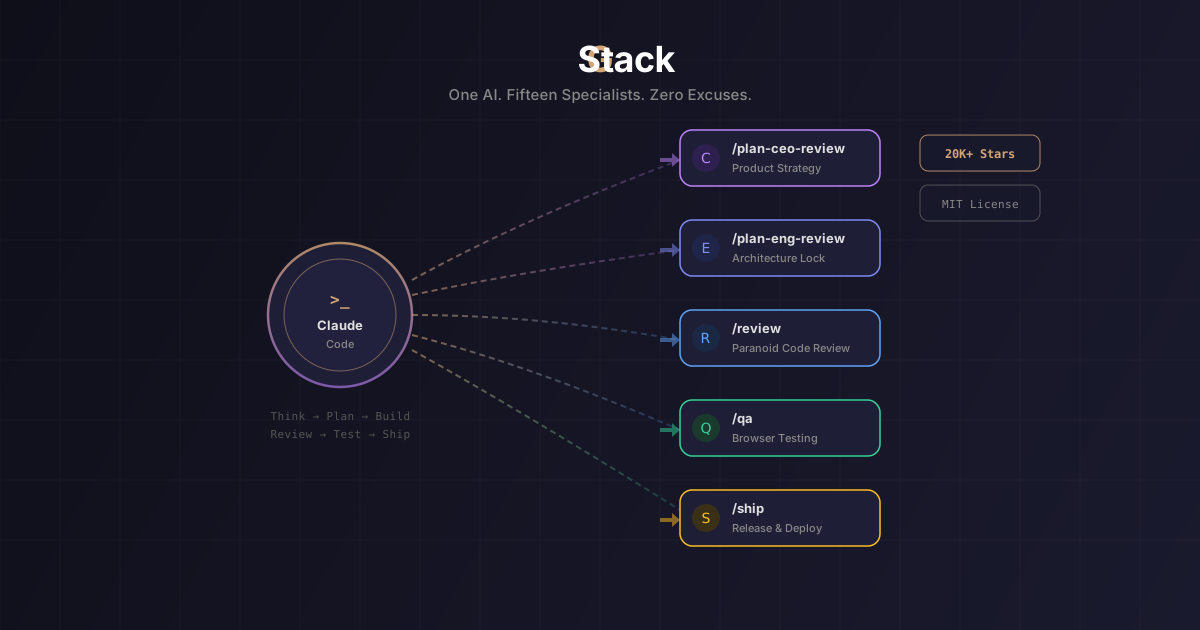
Last week, Y Combinator CEO Garry Tan dropped a GitHub repo and the developer internet split in half. Some called it “god mode.” Others called it “a bunch of prompts.” In eight days, it racked up 20,000 GitHub stars and 2,200+ forks—numbers most open-source projects never see in their lifetime.
The project is called GStack, and whether you love it or hate it, it represents something important about where AI-assisted development is heading.
What Is GStack, Exactly?
At its core, GStack is a collection of 15 specialized skills (structured prompts) for Claude Code, Anthropic’s CLI-based AI coding assistant. You install it, and suddenly your single AI assistant transforms into a virtual software development team—each skill acting as a different team member with a distinct role.
Think of it like this: instead of asking one AI to do everything, you give it different hats to wear at different stages of development.
Here’s the lineup:
Planning & Ideation:
/office-hours— A product advisor that reframes your concept through six forcing questions/plan-ceo-review— Evaluates your plan like a CEO (with modes: Expansion, Hold Scope, Reduction)/plan-eng-review— Locks down architecture with data flow diagrams/plan-design-review— Design audit with 0-10 ratings
Building & Reviewing:
/review— Staff-engineer-level code review with auto-fixes/investigate— Systematic debugging methodology/design-review— Design audit that generates code fixes
Testing & QA:
/qa— Opens a real Chromium browser, clicks through your app, and generates regression tests/qa-only— Bug reporting without touching your code/browse— Real browser control with ~100ms command latency
Shipping:
/ship— Test-aware PR creation with framework bootstrapping/document-release— Auto-syncs your documentation/retro— Weekly retrospectives with per-person breakdowns
Plus 6 safety tools like /freeze (lock files from editing), /careful (warn before destructive commands), and /codex (cross-check with OpenAI for a second opinion).
Why Did It Blow Up on Twitter?
Three things collided to make GStack go viral.
1. The messenger matters. Garry Tan isn’t just any developer. He’s the CEO of Y Combinator, the most influential startup accelerator on the planet. When he says “this is how I ship code,” people listen. His claim? 10,000 to 20,000 usable lines of code per day and roughly 100 pull requests per week over a 50-day stretch, all using this exact setup.
2. The “cyber psychosis” moment. At SXSW 2026, Tan described his AI coding obsession as sleeping only four hours a night—not from stimulants, but from pure excitement. “I don’t need modafinil with this revolution,” he said. “I speak, it listens, and we create.” That kind of quote spreads fast.
3. It touched a nerve. GStack arrived at the exact moment developers are wrestling with a fundamental question: How should we actually work with AI? Not “should we use AI” (that debate is over) but “what’s the right workflow?” GStack offered one very opinionated answer.
The Philosophy: AI as a Team, Not a Tool
This is where GStack gets genuinely interesting, regardless of what you think about the hype.
The core insight is simple but powerful: different phases of software development require fundamentally different cognitive modes. A CEO thinks about what to build and why. An engineering manager thinks about architecture and data flow. A code reviewer is looking for ways things will break in production. A QA engineer wants to know if it actually works in a browser.
When you ask the same AI, in the same conversation, to plan a feature, implement it, review it, and ship it, you’re fighting against this reality. The AI tries to be everything at once, which usually means it’s mediocre at all of it.
GStack’s solution is role separation. Each skill forces the AI into a specific cognitive mode with a specific set of priorities. The /review skill isn’t trying to be helpful or creative—it’s trying to find bugs. The /plan-ceo-review skill isn’t writing code—it’s questioning whether you should build this thing at all.
The workflow follows a deliberate pipeline: Think → Plan → Build → Review → Test → Ship → Reflect. Each stage feeds into the next. Your /office-hours design doc becomes input for /plan-ceo-review, which shapes /plan-eng-review, which generates test plans for /qa. Information doesn’t get lost between stages because each skill hands off to the next.
How to Actually Use It
Getting started takes about 30 seconds. You need Claude Code, Git, and Bun v1.0+ installed.
In your Claude Code terminal, run:
git clone https://github.com/garrytan/gstack.git ~/.claude/skills/gstack && cd ~/.claude/skills/gstack && ./setupThen add the GStack skills section to your project’s CLAUDE.md file so Claude knows the commands are available.
From there, you work through the pipeline:
- Start with
/office-hoursto pressure-test your idea - Run
/plan-ceo-reviewto decide scope - Use
/plan-eng-reviewto lock architecture - Build your feature (standard Claude Code)
- Run
/reviewfor a paranoid code review - Fire up
/qato test in a real browser - Type
/shipto create a PR
You don’t have to use every skill every time. Many developers cherry-pick the ones that fit their workflow—/review and /qa seem to be the most universally adopted.
The Backlash: “It’s Just Prompts”
Not everyone was impressed. The criticism fell into a few camps.
“This is nothing new.” Vlogger Mo Bitar voiced what many developers were thinking: GStack is essentially “a bunch of prompts” that many people had independently created in private. The argument: Tan’s visibility as YC CEO, not the tool’s uniqueness, is what drove the attention.
“The claims are overblown.” One founder pointed out the irony of a CTO calling GStack “god mode” because its review skills caught XSS vulnerabilities—arguing that if those flaws existed in the first place, maybe the coding workflow wasn’t as miraculous as advertised.
“Celebrity-driven open source.” Some developers questioned whether the project received unfair platform advantages on Product Hunt and GitHub, benefiting from Tan’s massive following rather than technical merit.
These criticisms aren’t wrong, exactly. Many experienced developers have built similar prompt systems. The individual prompts aren’t revolutionary.
But that might be missing the point.
Why It Matters Anyway
Here’s the thing about GStack that even skeptics should acknowledge: it formalizes and open-sources a workflow pattern that was previously locked in private setups. The value isn’t in any single prompt—it’s in the structured pipeline and the philosophy of role separation.
Before GStack, if you wanted a systematic AI coding workflow, you had to build it yourself. Now there’s a shared, battle-tested starting point that anyone can fork, modify, and improve. That’s how open-source ecosystems grow.
GStack also represents a broader shift in how we think about AI tools. We’re moving past the phase of “AI writes code for me” into “AI operates as part of a structured process.” The future of AI-assisted development probably looks less like a single chatbot and more like an orchestrated team of specialized agents—each with clear responsibilities, clear handoffs, and clear quality gates.
Whether GStack specifically becomes the standard doesn’t matter as much as the pattern it popularized: treat your AI like a team you manage, not a tool you use.
TL;DR
- GStack is Garry Tan’s open-source skill pack that turns Claude Code into a virtual engineering team with 15 specialized roles
- It went viral because of Tan’s profile, bold productivity claims (10K+ lines/day), and the timing of the AI workflow debate
- The core philosophy: different dev phases need different cognitive modes—separate them into distinct AI “roles”
- Critics say it’s “just prompts” elevated by celebrity status—and they’re partially right
- The real value is the formalized workflow pattern: Think → Plan → Build → Review → Test → Ship → Reflect
- Install it in 30 seconds and cherry-pick the skills that fit your workflow
Sources
Join the discussion
Thoughts, critiques, and curiosities are all welcome.